Blog
Best AI for Meetings
Compare the best AI for meetings, including Read AI, Fathom, Otter and Cedric, an AI agent that presents your slides and attends meetings for you.
 Ruby Chen
The best AI for meetings depends on what you want help with. Do you need accurate notes, searchable recordings, sales insights, or an AI colleague who can present your slides and attend when you cannot?
Read AI, Meeting.ai, Fathom, tl;dv, and Otter.ai help teams capture conversations and turn them into useful information. Several also automate follow-up work. Cedric AI for Meetings adds another possibility: an agent that takes part in the meeting itself.
Here is how these tools compare, and where Cedric offers something different.
What can AI meeting assistants do today?
Most AI meeting assistants help with a familiar problem: a useful conversation happens, but its details disappear into scattered notes, recordings, and people's memories.
Depending on the product and plan, an assistant can record a call, transcribe speakers, summarize decisions, identify action items, and let you search past conversations. More advanced features include sales coaching, CRM updates, cross-meeting analysis, and generated follow-up documents.
These capabilities save time both during and after a meeting. But when choosing the best AI for meetings, it helps to distinguish between capturing a conversation, completing the resulting work, and actively participating in the call.
AI meeting assistants: features and pricing
Prices below were checked on November 6, 2026. Annual prices are monthly equivalents billed annually. Currencies reflect the published pages; regional prices, taxes, usage limits, and offers may vary.
| Tool | Main capabilities | Free option | Paid pricing |
|---|---|---|---|
| Read AI | Transcripts, summaries, enterprise search, meeting coaching, and integrations | Five meeting transcripts per month | Pro: US$15/user/month annually or US$19.75 monthly. Enterprise: US$22.50 annually or US$29.75 monthly |
| Meeting.ai | Online and in-person notes, multilingual transcription, visual summaries, and generated decks, documents, and spreadsheets | First meeting free; eligibility and coin allowance vary | Displayed monthly plans: Intern €28.50, Manager €47.50, Director €66.50; coin-based usage |
| Fathom | Recordings, transcripts, summaries, searchable calls, team collaboration, and CRM sync on higher plans | Unlimited recordings and transcriptions, with instant call summaries | Premium: US$16/user/month annually or US$20 monthly. Team: US$15 annually or US$19 monthly, two-user minimum |
| tl;dv | Recordings, multilingual transcripts, AI notes, cross-meeting search, follow-up drafts, and integrations | Unlimited recordings and transcription, with limits on AI features and retention | Pro: 18/seat/month annually or 29 monthly; the vendor states the same numeric prices in EUR and USD |
| Otter.ai | Live transcription, speaker identification, AI chat, summaries, and meeting workflows | 300 transcription minutes per month | Pro: US$8.49/user/month annually or US$16.99 monthly, as displayed when checked |
| Cedric AI for Meetings | Live participation, slide presentations, answers from connected tools, Attend-for-Me, shared memory, and task execution | 100,000 starting credits, no card required | Starter: US$19/month. Max starts at US$99/month. Work and meeting usage consume credits |
Read AI: meeting insights and searchable context
Read AI combines meeting summaries and transcription with search across workplace information. Its meeting coaching features help users reflect on how they communicate, while paid integrations connect meeting insights with tools such as HubSpot, Salesforce, Notion, and Jira.
It is worth considering if your priority is understanding conversations and finding information across meetings and other workplace sources.
Meeting.ai: from meeting notes to finished documents
Meeting.ai captures online and in-person conversations in more than 30 languages. Alongside transcripts and action items, it offers a visual summary and can turn meeting content into presentations, documents, spreadsheets, and PDFs.
Its coin-based plans cover both meeting capture and AI work. That makes the usage allowance important: recording hours and document generation draw on the plan's resources.
Fathom: recording, summaries, and team collaboration
Fathom offers unlimited recordings and transcriptions on its free plan, making it an accessible starting point for people who want a reliable meeting record.
Paid plans add capabilities such as advanced summaries, team workspaces, and search across team calls. Its Business plan adds CRM field synchronization and coaching features, which can support sales teams.
tl;dv: searchable recordings and follow-up workflows
tl;dv combines video recordings and multilingual transcription with AI notes, search, and integrations. Its Pro plan adds features such as custom note templates, action-item assignment, and follow-up email drafting.
For teams that regularly review customer conversations, a searchable recording library can make recurring questions and past decisions easier to revisit.
Otter.ai: live transcription and AI meeting workflows
Otter.ai offers live transcription, speaker identification, AI chat, and meeting workflows. Users can ask questions within and across meetings, helping them retrieve information without replaying an entire conversation.
Its free plan includes 300 monthly transcription minutes. Paid plans increase capacity and add workflow, integration, and administration features.
Why Cedric AI for Meetings takes a different approach
Cedric AI for Meetings launched on November 2, 2026, with the positioning “the first AI agent to present your slides and attend for you.” The launch finished #4 Product of the Day on Product Hunt, with 240 votes reported by the Cedric team.
That positioning reflects a broader ambition: helping with the conversation while it is happening.
Cedric joins Google Meet, Microsoft Teams, and Zoom as a visible participant. You can brief him on the meeting's purpose, what to present, what to ask, and what he must not commit to. Screen sharing is currently supported on Google Meet and Zoom.
With the relevant tools connected, Cedric can answer questions using business information during the call. Afterwards, he can prepare notes and follow-ups for approval and carry out the resulting work.
What does that look like in practice?
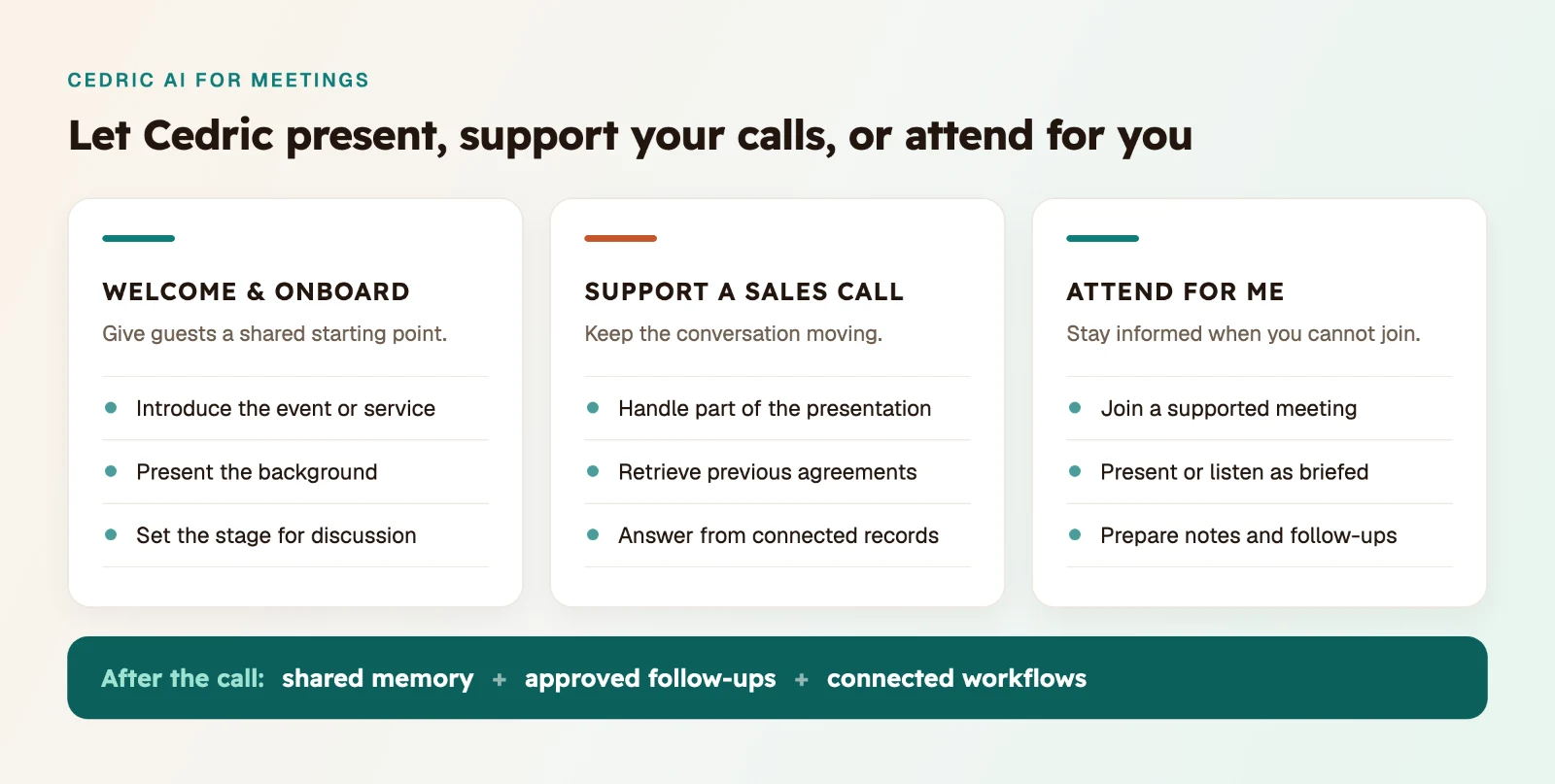
1. Welcome clients and event guests with a shared introduction
Many events need everyone to understand the same background before a useful discussion can begin.
Cedric can welcome guests, present an introduction, and explain the session's purpose. For client onboarding, that could mean walking through the service, the people involved, and the next steps. For an event, it could mean introducing the topic and explaining what attendees can expect.
In one example shared by the Cedric team, a client used Cedric to present cultural background to attendees at a cultural exchange event.
The presentation gave participants a common starting point before the dialogue began. Organizers could then focus on welcoming people and facilitating the exchange.
This is particularly useful when the same introduction needs to be delivered repeatedly.
2. Support salespeople during client presentations
A salesperson often has to present, listen, answer questions, and remember previous agreements at the same time.
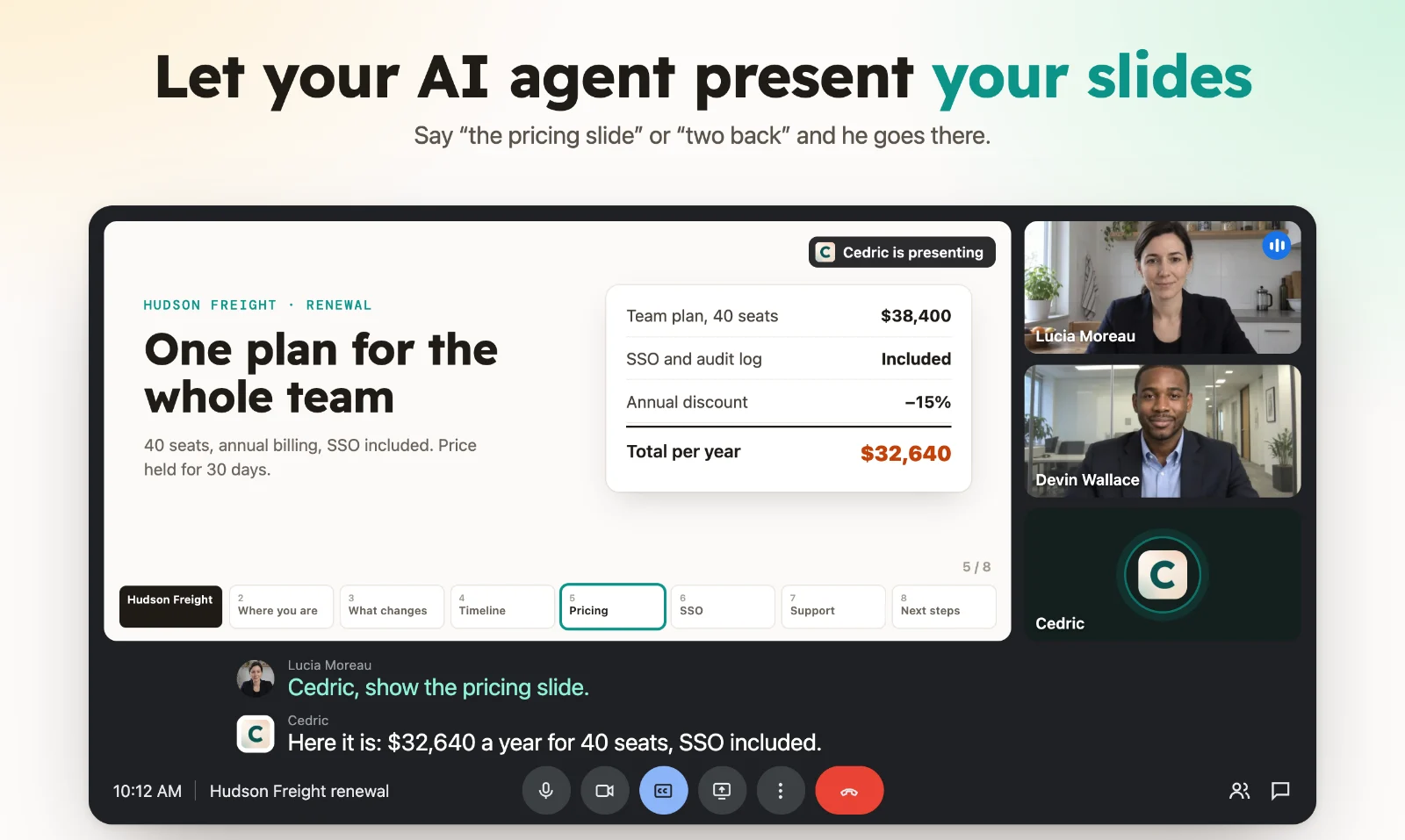
Cedric can share that workload. He can handle part of the presentation and respond when asked for information from connected tools, giving the salesperson more room to focus on the client.
For example:
- “Cedric, what did we agree with this client before today's meeting?”
- “What quantity of this product was included in their previous contract?”
- “Can you bring up the latest figures from our sales sheet?”
The answer depends on the records Cedric can access and the permissions granted. With the right information available, the team can address questions without interrupting the discussion to search through documents.
Having another participant handle slides or retrieve context may also help a presenter feel more supported. It creates opportunities to pause, listen, and let the conversation develop.
3. Use Attend-for-Me when you cannot join
Overlapping calls and busy schedules make it impossible to attend everything.
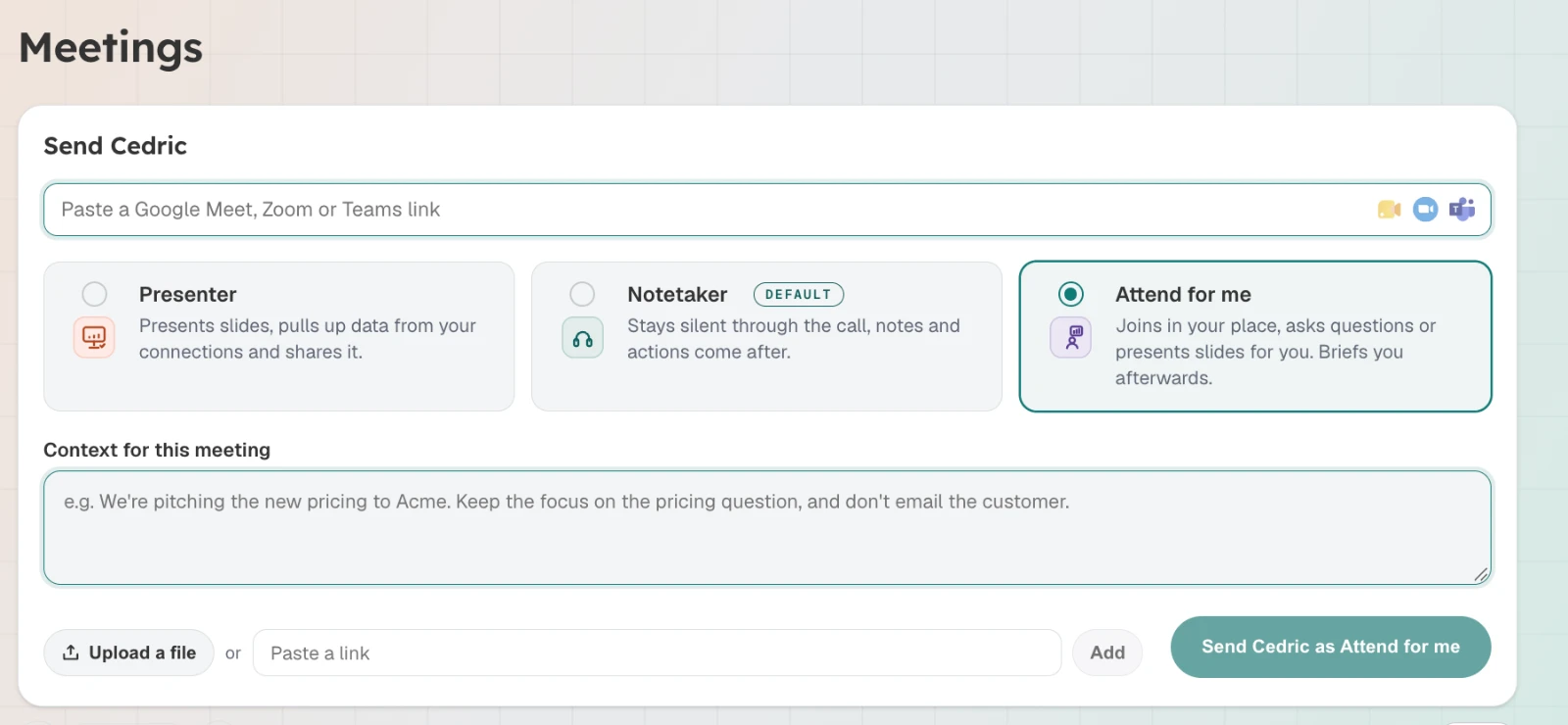
With Attend-for-Me, you can send Cedric to a supported online meeting with a brief. For an informational session, the task might be to listen, capture the main points, and prepare notes. For a recurring update, it could include presenting an approved deck or asking specific questions.
Webinars are another possible use case where the platform and host allow an AI participant to join.
The brief defines Cedric's role: what to cover, what information to gather, and what requires your decision. You can then review the outcome and follow-ups afterwards.
For suitable meetings, this gives you a way to stay informed and represented when your calendar prevents you from joining personally.
Beyond meetings: build a company brain that can act
Meetings contain much of a team's working context: why a client changed direction, how a decision was reached, which concerns remain open, and what someone promised to do next.
Cedric's shared memory helps retain that context alongside information from connected tools. Over time, it can become a company brain that helps the team understand both what happened and what needs to happen next.
The value extends beyond retrieving notes. Through more than 3,000 integrations, Cedric can fetch information and carry out supported actions in the tools a team already uses.
After a client call, that could mean updating a CRM record, preparing a follow-up email, or creating tasks. The available actions depend on the connected integrations and permissions, with important actions held for approval.
The same assistant can also handle recurring work:
- Monitor brand mentions and summarize relevant coverage.
- Track competitors and report meaningful changes.
- Prepare or publish scheduled social posts under an agreed workflow.
- Deliver daily or weekly reports from connected business data.
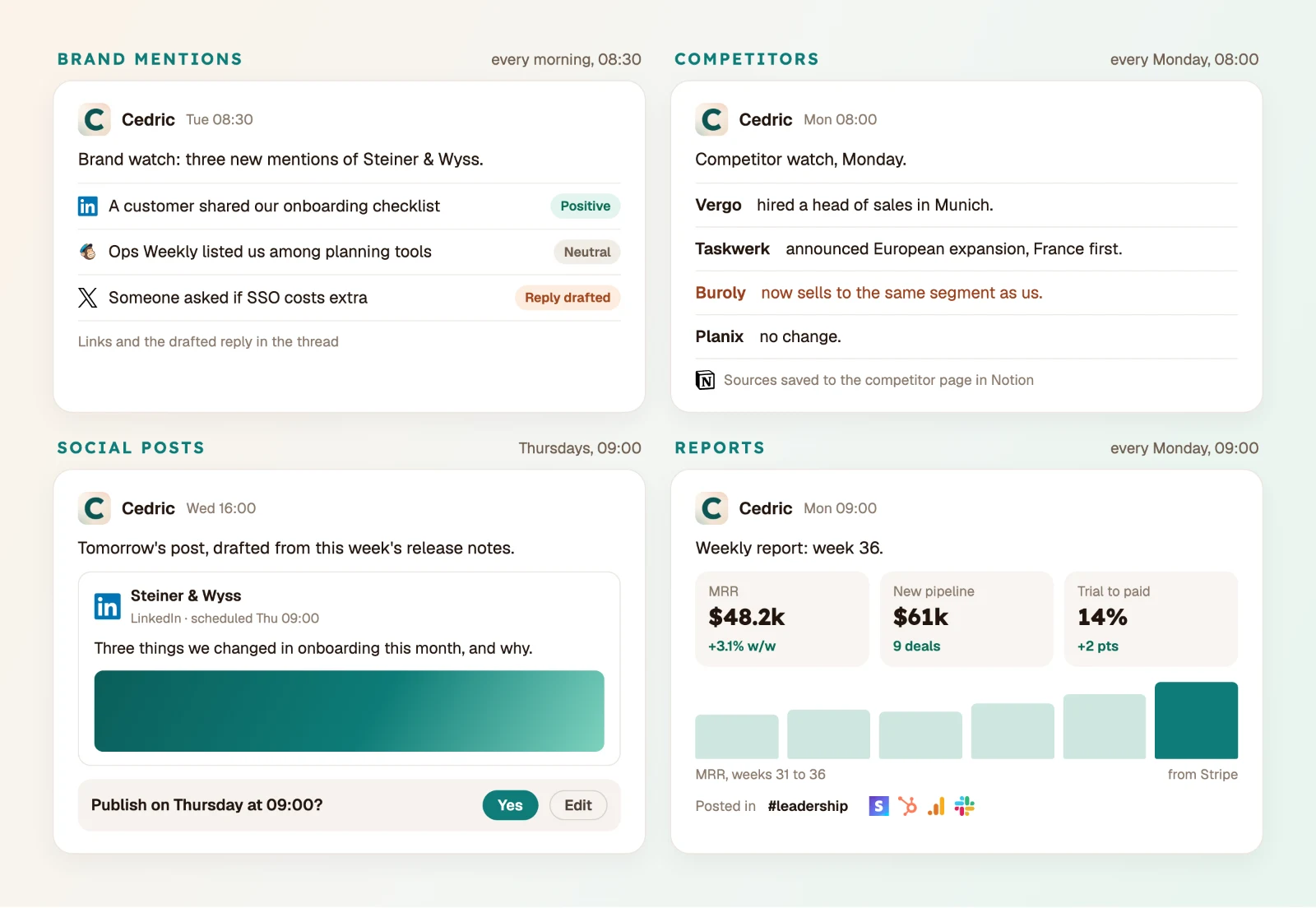
A meeting about declining sales can therefore lead into a recurring sales report. A discussion about marketing visibility can become a brand-monitoring workflow. The context carries into the work.
Which is the best AI for meetings for your team?
Start with the job you want to delegate.
Read AI, Meeting.ai, Fathom, tl;dv, and Otter.ai each offer ways to capture conversations and make their contents useful. Some also provide substantial follow-up automation.
If you want an assistant who can present your slides, support a live client conversation, and attend a suitable meeting on your behalf, Cedric deserves a closer look. His shared memory and connected tools also help turn meeting context into ongoing execution.
Try Cedric AI for Meetings with 100,000 starting credits and no credit card required.