Blog
n8n vs Zapier vs Cedric: build the workflow, or ask for the work
n8n and Zapier are both workflow builders, one you can self-host and code in, one with 9,000+ apps. Cedric is the third option: no builder, you ask in Slack and he does the job.
 Benjamin Ben Hattar
Most people who compare n8n and Zapier have already decided to automate something. The open question is which builder to build it in. That is a fair question, and both tools answer it well, in different ways.
This post adds a third option that is not a builder at all. With Cedric you do not draw the workflow. You ask for the work in the chat app your team already uses, and he works out the steps. Whether that suits you depends on the job, so the post says where each of the three is the right pick.
One note on fairness. Every fact about n8n and Zapier below was read on their own sites on September 17, 2026. Where one of them is the better choice, it says so.
- n8n is the builder for technical teams: a visual canvas, JavaScript or Python in any step, and a free Community Edition you can run on your own servers.
- Zapier is the builder with the widest reach: 9,000+ apps, a free plan with 100 tasks a month, and the gentlest learning curve of the two.
- Both charge by volume. n8n counts workflow executions, Zapier counts tasks, and both meters suit work you can forecast.
- Cedric has no builder. You write a sentence in Slack, Telegram, Discord or the browser, he plans the steps, and he asks before he sends, changes or spends anything.
- Pick a builder when the procedure is known and runs thousands of times. Pick Cedric when working out the procedure is most of the job.

n8n
AI agents and workflows you can see and control. n8n.io

n8n describes itself as a place to "build visually, go deep with code, connect to anything". That sentence is accurate. You lay nodes out on a canvas, and wherever the canvas runs out you write JavaScript or Python inside the step. Its homepage lists over 500 integrations, and an HTTP node reaches anything with an API.
What sets it apart is where it runs. You can use n8n's cloud, or deploy it on your own infrastructure, on-premise and air-gapped if you need that. The Community Edition is self-hosted and free, with the source on GitHub. For a team with a data-residency rule, that alone can settle the choice.
The cloud plans include unlimited users and unlimited workflows, and the price follows monthly workflow executions however many steps each one has.
Pros
- Self-hosting, including a free Community Edition.
- Code in any step, so a hard case never blocks you.
- Unlimited users and workflows on every cloud plan.
- Every step of an agent's reasoning is visible on the canvas.
Cons
- You build and maintain each workflow, and self-hosting means you run the server too.
- Over 500 integrations, far fewer than Zapier's catalog. The HTTP node covers the rest if someone writes the call.
- It expects a technical owner. A sales lead will not open the canvas.
Community Edition free, self-hosted. Cloud: Starter €20 a month for 2,500 executions, Pro €50 for 10,000, billed annually. Business €667 for 40,000, self-hosted.
Checked on the tool's own site, September 17, 2026.

Zapier
Workflows across 9,000+ apps, built without code. zapier.com
Zapier is the tool most people automate with first, and the reason is reach. It connects 9,000+ apps, so the odd invoicing tool or regional CRM you use is probably there. A Zap is a trigger and a list of steps, and someone who has never written code can ship one in an afternoon.
Around the Zap it now sells Tables, Forms, Canvas, Agents, Chatbots and an MCP layer. The core idea has not changed: you are the author, and once built, the workflow runs the same way every time. That reliability is what you pay for.
The meter is the task. Zapier counts one whenever it completes a unit of work for you. Triggers, polling and built-in tools do not count, and neither do failed actions.
Pros
- 9,000+ apps, the widest catalog here.
- A free plan with 100 tasks a month.
- No code needed, and a builder non-technical people finish.
- Runs identically every time, which is what a pipeline needs.
Cons
- Cloud only. There is no self-hosted Zapier.
- Tasks add up on multi-step Zaps, and the Professional and Team prices climb by tier.
- A Zap follows the rule you wrote. It cannot judge whether a lead deserves a reply.
Free for 100 tasks a month. Professional from $19.99 a month billed annually ($29.99 monthly). Team from $69 a month billed annually ($103.50 monthly). Enterprise on request.
Checked on the tool's own site, September 17, 2026.

Cedric
The AI teammate you ask, in the chat app your team already uses. meet-cedric.com
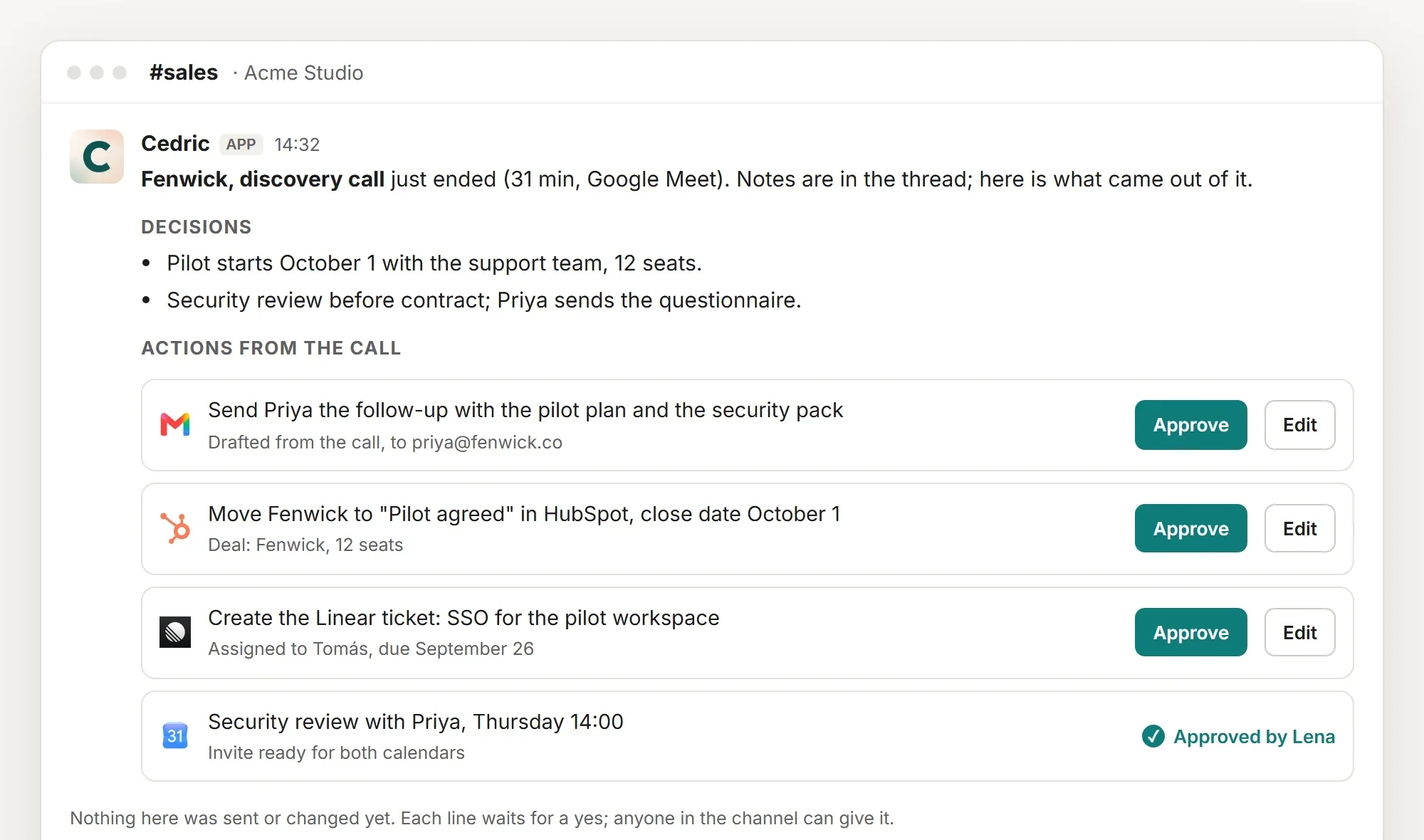
Cedric starts from the other end. There is no canvas and nothing to build. You write to him in Slack, Telegram, Discord or the browser the way you would write to a colleague: "someone new wrote in, worth a call?" He reads the mail, the CRM and the calendar, decides what the job needs, does it, and reports back.
Where a step would send, change or spend something, he stops and asks. The picture above is that moment: the work drafted, each action with an Approve button, nothing out the door until someone presses it.
Recurring work needs no builder either. "Send me this every Monday at nine" is a sentence, and Cedric keeps the schedule. He connects to a catalog of 3,200 apps, and one memory of your company sits behind every ask, so the second request is shorter than the first.
There is no price per seat and no task meter to forecast. A workspace starts with 100,000 free credits, about $50 of work, no card. Plans start at $19 a month for the whole team.
Pros
- No build step. The ask is the workflow.
- Handles judgment: is this lead a fit, which invoice is late, what should the reply say.
- Asks before he sends, changes or spends anything.
- One plan for the whole team, free credits to start.
Worth knowing
- For ten thousand identical runs a day, a pipeline in n8n or Zapier is the right tool. Cedric can sit beside it.
- His catalog is 3,200 apps. For a rare tool, check Zapier's 9,000+ first.
Plans from $19 a month for the whole team, no seats. 100,000 free credits to start.
Side by side
The same three, on the questions that decide it.
| n8n | Zapier | Cedric | |
|---|---|---|---|
| What you do | Build on a canvas, code where needed | Build a Zap, no code | Ask in a sentence |
| Where it runs | Your servers or n8n's cloud | Zapier's cloud | Slack, Telegram, Discord, browser |
| Apps | Over 500, plus any API | 9,000+ | 3,200 |
| Judgment calls | If you script them | Follows the rule you wrote | Decides the steps, asks before acting |
| What is metered | Workflow executions | Tasks | Credits, one plan per workspace |
| Free to start | Community Edition, self-hosted | 100 tasks a month | 100,000 credits |
| Who owns it | A technical person | Whoever built the Zap | Anyone in the team |
Read on each tool's own site on September 17, 2026. n8n's prices were shown in euros.
How to choose
If your data has to stay on your own servers, or your team wants code in the loop, pick n8n. If the app you need is obscure and nobody on the team writes code, pick Zapier. In both cases you are buying a pipeline, and a pipeline is the right thing when the procedure is known and the volume is high.
If the work changes shape every time, such as a new lead, a customer question or a report nobody has asked for before, a builder has nothing to hold on to. That is the work Cedric takes. Plenty of teams run both, a Zap for the form that feeds the CRM and Cedric for everything someone would otherwise do by hand.
FAQ
For high-volume pipelines, no. Keep the builder. Cedric replaces the work around the pipeline: the judgment calls, the one-off requests and the follow-up somebody does by hand.
No. Zapier runs in Zapier's cloud. Of the three, only n8n can be self-hosted, and its Community Edition is free.
Not for simple workflows. The canvas covers them. Code in JavaScript or Python is there for the steps the nodes do not cover.
n8n meters executions and Zapier meters tasks, so the bill follows volume. Cedric has one plan per workspace from $19 a month with no seats, metered in credits, and the first 100,000 credits are free.
Free credits available, no card, no seats.