Blog
The best AI agents for sales
Apollo, Clay, HubSpot's prospecting agent, Agentforce, Artisan and Cedric side by side: what each sales agent does, what it costs, and when to pick it.
 Benjamin Ben Hattar
"AI agent for sales" now covers tools with very different jobs. Some find the people to write to. Some write to them and answer the replies. Some live inside the CRM. And some pick up the work around each deal, like the inbound lead nobody has read or the follow-up that should have gone out an hour after the call.
We picked the five that sales teams ask us about most, read each one's own site and pricing page on the same day, and took the screenshots there. Cedric comes last. He is our product, so read his card with that in mind. He also connects to Apollo, HubSpot and Salesforce, so for many teams the real choice is which of these to run beside him.
Where a tool is the better choice, we say so.
- Apollo is the all-in-one for outbound: a 240 million contact database, sequences, and agents on the $79 Professional plan.
- Clay is the most flexible: data from 150+ providers, an agent that researches the web, unlimited seats, priced by usage.
- HubSpot's prospecting agent works inside HubSpot and costs $1 for each lead it recommends outreach for.
- Agentforce covers the most ground for Salesforce customers, from lead engagement to coaching and quotes.
- Artisan's Ava runs outbound on her own, replies and meeting booking included, with an approval mode if you want one.
- Cedric does the work around each deal from Slack and asks before anything goes out. No seats, 100,000 free credits.

Apollo
A contact database, sequences and sales agents in one tool. apollo.io
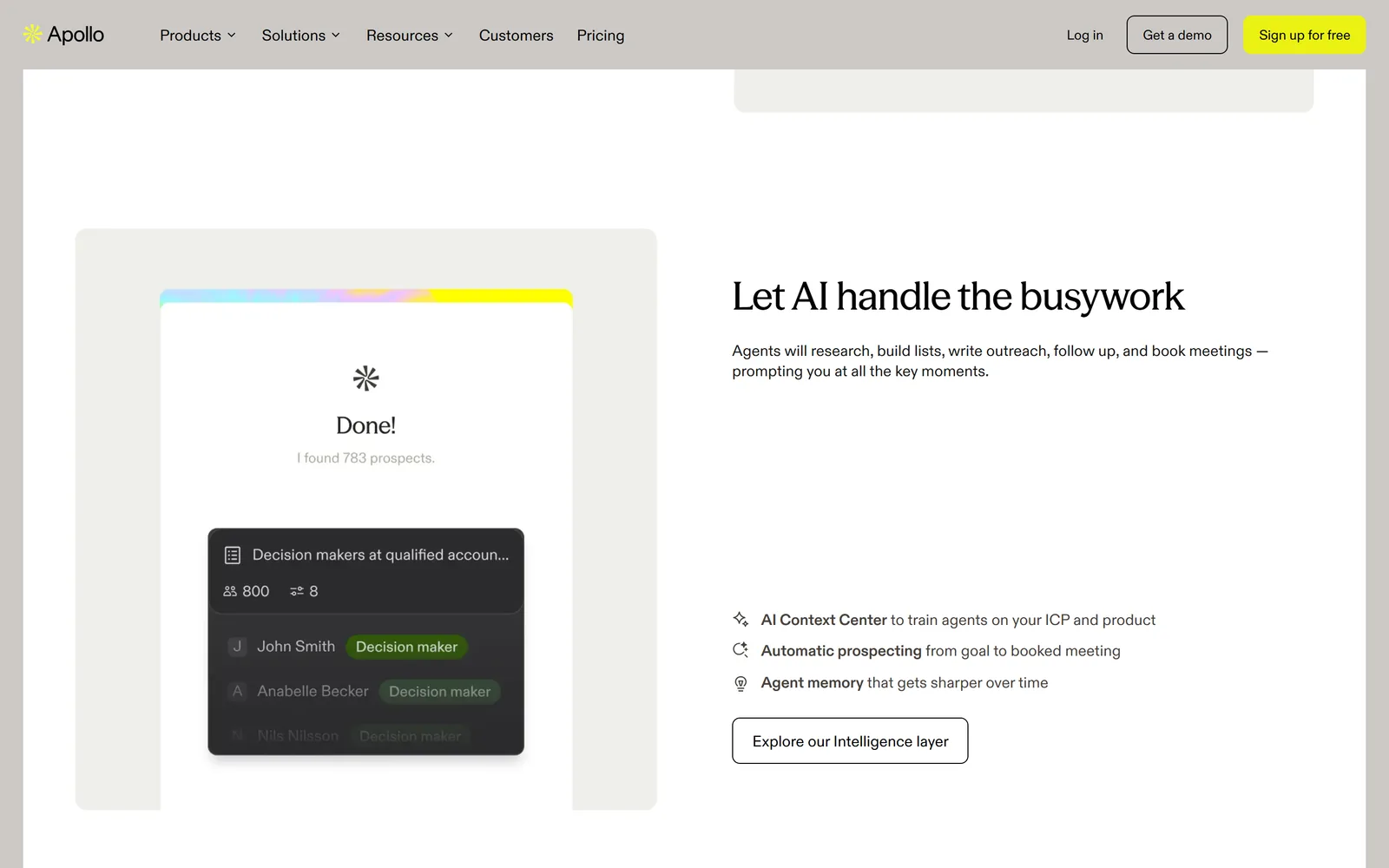
Apollo started as a contact database and now calls itself an AI GTM system. The database is still why most teams sign up. It holds 240 million contacts and 30 million companies, searchable by title, industry, size and buying signals, and you can ask for a lead list in plain words instead of stacking filters.
Sequences, a dialer, call recording and deal management sit on top, and now agents. Apollo says they research, build lists, write outreach, follow up and book meetings, and prompt you at the moments that need a person. The AI Assistant is on every plan, limited to five chats on Free. The agents start on Professional.
Pros
- Data, sequences and a dialer in one place.
- Lead lists from a plain-language request.
- A usable free plan, plus Gmail and Salesforce extensions.
- CRM integrations from the Basic plan, 200+ integrations in all.
Cons
- Per seat: $49, $79 or $119 a month, billed annually. Monthly billing costs more.
- Agents only from Professional, $79 a seat.
- Exports and enrichment spend credits, and Free gets 900 a year.
Free plan; Basic $49, Professional $79, Organization $119 per seat per month billed annually (Organization from 3 seats).
Checked on the tool's own site, September 27, 2026.

Clay
A table that can fetch any data and act on every row. clay.com
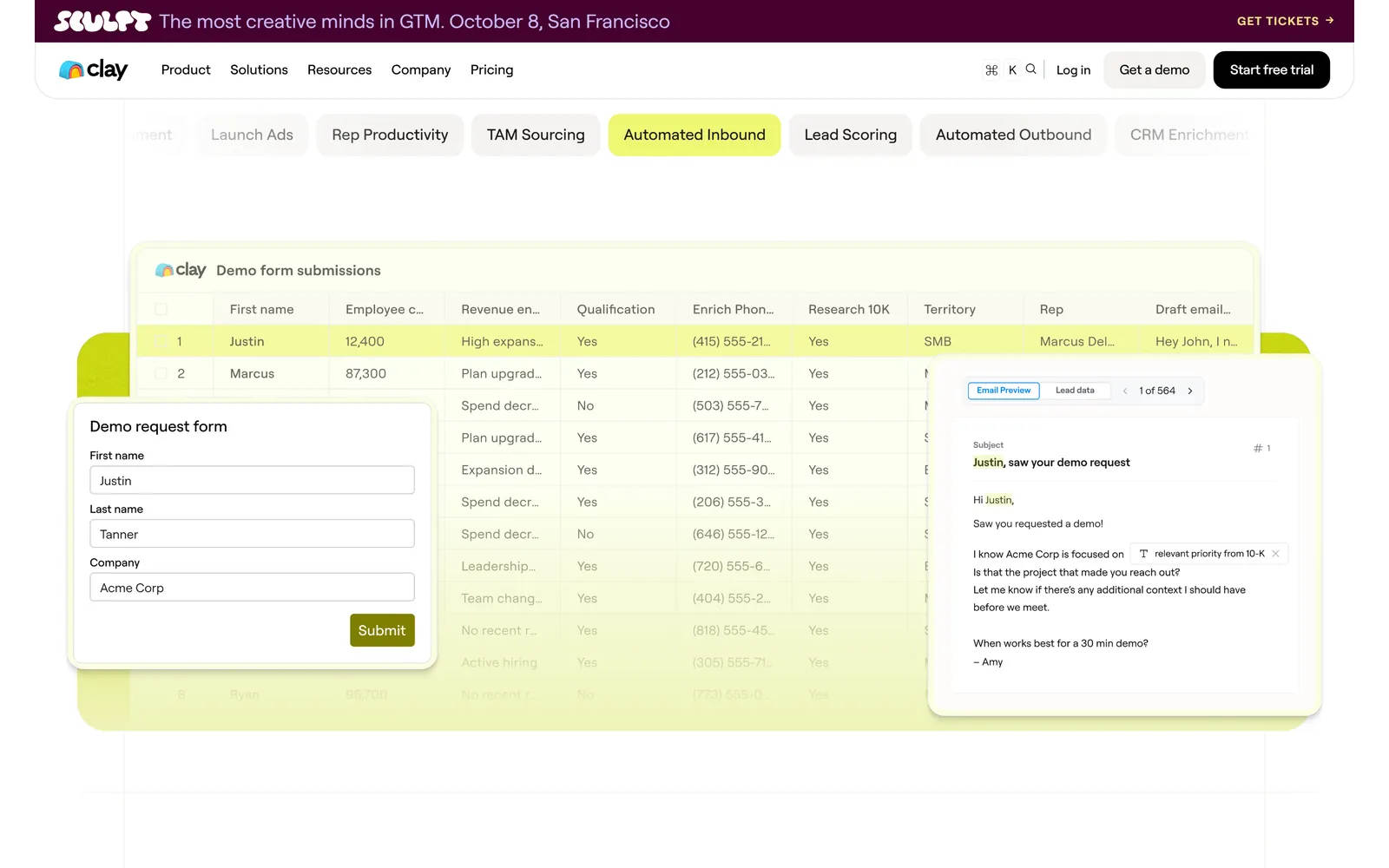
Clay works like a spreadsheet that can reach anything. Each row is a company or a person. Each column pulls data from a provider, runs Claygent (Clay's agent that researches the web to fill a custom field), or sends the row to another tool. The pricing page counts 150+ enrichment providers, and Clay runs them as a waterfall: if the first has no phone number, the next one tries.
The screenshot is Clay's own inbound example. A demo request arrives, the row fills with company size, revenue, a qualification verdict and a territory, and a draft reply waits beside it. Teams that already think in tables get the most from it. Clay calls the people who build these setups GTM engineers and runs a university for them, so budget time to learn it.
Pros
- Unlimited seats on every plan, Free included.
- Waterfall enrichment across many providers on one contract.
- Claygent fills any field the web can answer.
- Webhooks and CRM auto-sync on Growth.
Cons
- Priced by actions and data credits, which takes planning.
- CRM integrations start on Growth, from $446 a month.
- Someone on the team has to design and maintain the tables.
Free plan (6,000 actions and 1,200 data credits a year); Launch from $167 a month; Growth from $446 a month; Enterprise custom.
Checked on the tool's own site, September 27, 2026.
HubSpot prospecting agent
Research and outreach drafts, inside the CRM you already use. hubspot.com/products/sales/ai-prospecting-agent
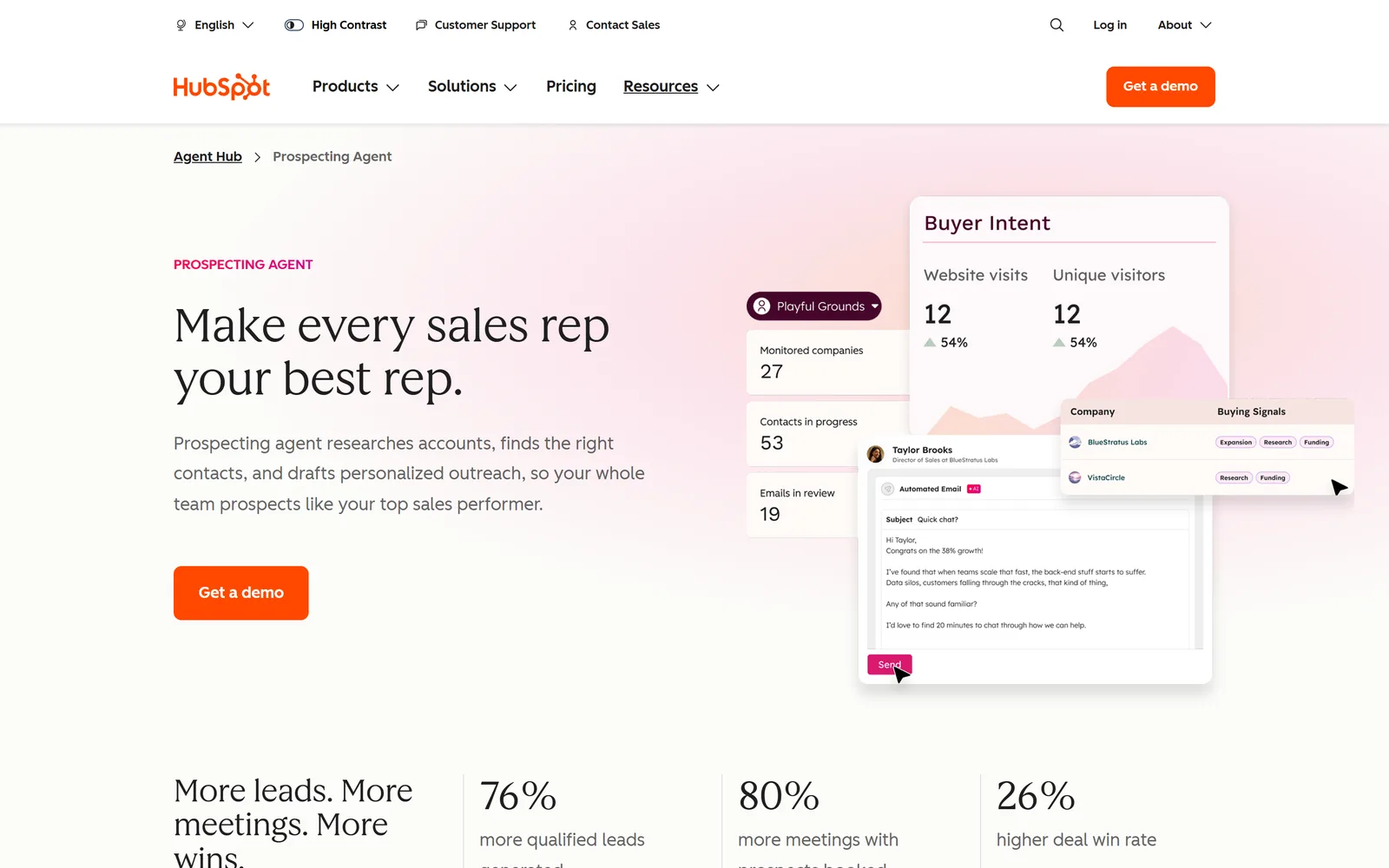
If your team already lives in HubSpot, this is the least new software you can add. The prospecting agent sits in what HubSpot now calls Agent Hub, next to agents for content, service and data. It watches for buying signals such as funding rounds, leadership changes and site visits, scores accounts against your ideal customer profile, finds and enriches the contacts, and drafts outreach in each rep's voice.
You can review and edit every draft before it goes, then switch to autonomous sending once the drafts have earned it. For contacts it can draw on ZoomInfo, Apollo, Surfe and Seamless. On Sales Hub Professional, deal progression suggests next steps and CRM updates after each call.
Pros
- No sync to maintain. It works on your HubSpot data.
- You pay $1 per lead it recommends outreach for.
- Drafts reviewed first, autonomous only when you choose.
- Contacts from ZoomInfo, Apollo, Surfe and Seamless.
Cons
- Only for teams on HubSpot.
- Sales Hub seats come first: Starter from $7, Professional $90 a seat a month, billed annually.
- Professional adds a one-time $1,500 onboarding fee.
$1 per lead recommended for outreach, paid in HubSpot Credits, on Sales Hub Starter, Professional or Enterprise.
Checked on the tool's own site, September 27, 2026.
Salesforce Agentforce
Agents for every stage of the deal, built into Salesforce. salesforce.com/sales/ai-sales-agent
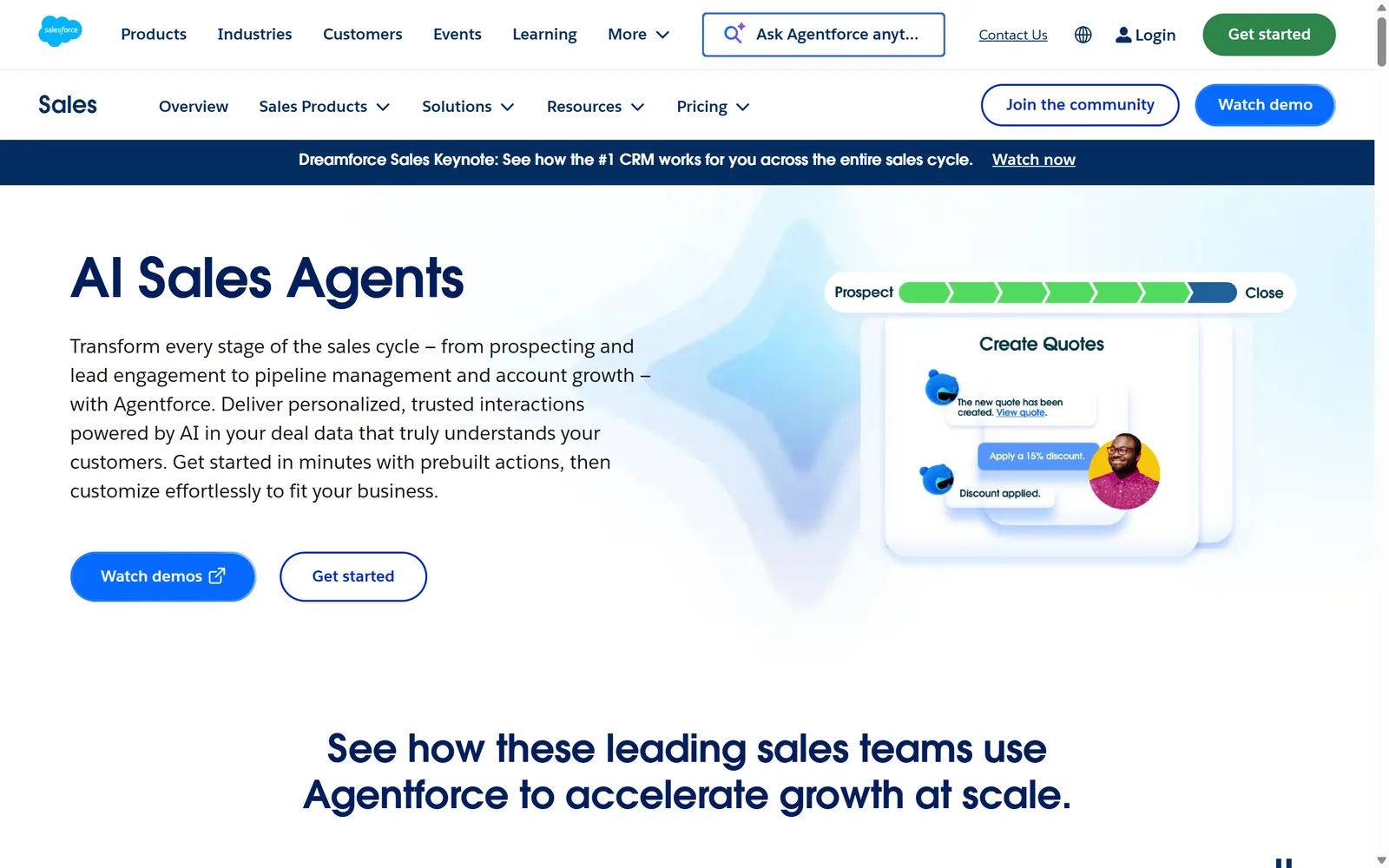
Agentforce is Salesforce's agent platform, and its sales page covers the whole cycle. Agents rank leads and write personalized outreach, engage website visitors and book meetings, and turn calls, meetings, emails and seller notes into updates on the opportunity. They also compile account research, coach reps through role-play practice, and build quotes from a plain request in Salesforce or Slack.
For a company already on Salesforce, that is a lot of reach from one vendor, working on the data you already keep there. Pricing comes in three shapes. Flex Credits cost $500 per 100,000, and an action uses 20, so about ten cents an action. The Sales add-on is $125 a user a month with unmetered use. Agentforce 1 Editions start at $550 a user a month. You can start free with Salesforce Foundations.
Pros
- The widest scope here: outreach, pipeline, coaching and quotes.
- Opportunity fields updated from calls, meetings and email.
- Works in Slack as well as in Salesforce.
- Pay per action or per user, whichever fits your usage.
Cons
- Built for Salesforce customers.
- Three pricing models to compare before you commit.
- The unmetered Sales add-on is $125 a user a month.
Free start with Salesforce Foundations; Flex Credits $500 per 100,000 (20 per action); Sales add-on $125 per user per month; Agentforce 1 Editions from $550.
Checked on the tool's own site, September 27, 2026.
Artisan
Ava, an AI BDR that runs outbound from list to booked meeting. artisan.co
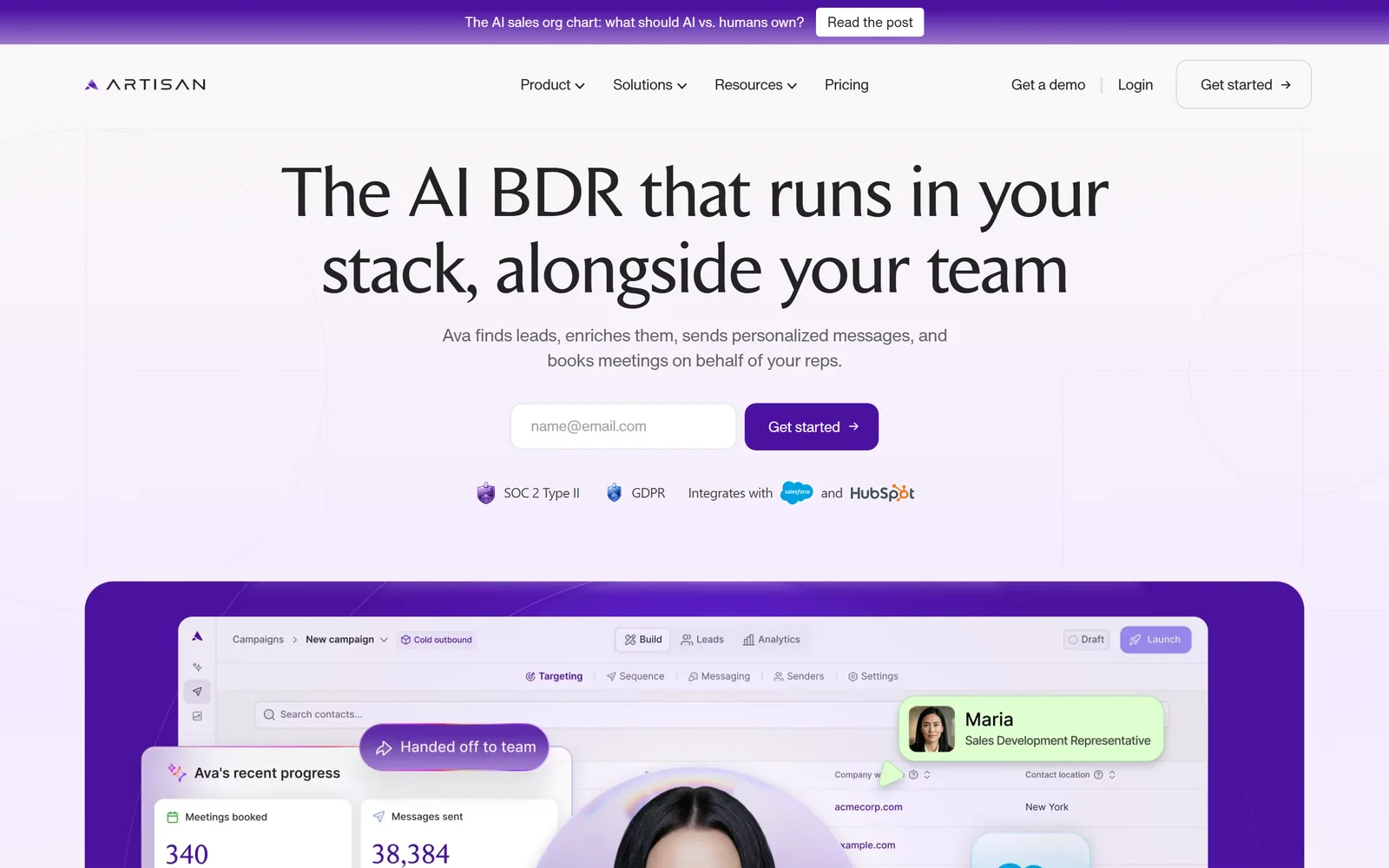
Artisan sells one thing, Ava, which it calls an AI BDR. Ava searches a database of more than 250 million contacts or imports from your CRM, enriches them from 22+ sources, and ranks them by signals like funding rounds and leadership hires. She runs sequences across email and social, tests message variations and moves volume to the ones that work.
Then she handles the replies. She qualifies the interested leads, answers objections and books meetings on your reps' calendars, sending in their names from your own domains. You decide how far she goes. In approval mode she drafts every reply and waits for a click, and escalation rules pull a person in when a conversation crosses your line. Salesforce and HubSpot sync both ways, and results report into Slack.
Pros
- The most autonomous outbound here, replies and booking included.
- Approval mode and escalation rules, set per campaign.
- Data, sequencing and dialing in one platform.
- A success manager in a shared Slack channel on every plan.
Cons
- No public price. Plans are scoped with sales.
- Sized by volume. Team is about 2,500 leads contacted a month.
- The AI dialer is an add-on, priced per seat.
On request: Team (about 2,500 leads contacted a month), Scale (about 6,000) and Enterprise.
Checked on the tool's own site, September 27, 2026.

Cedric
The AI teammate that does the work around each deal, and asks first. meet-cedric.com
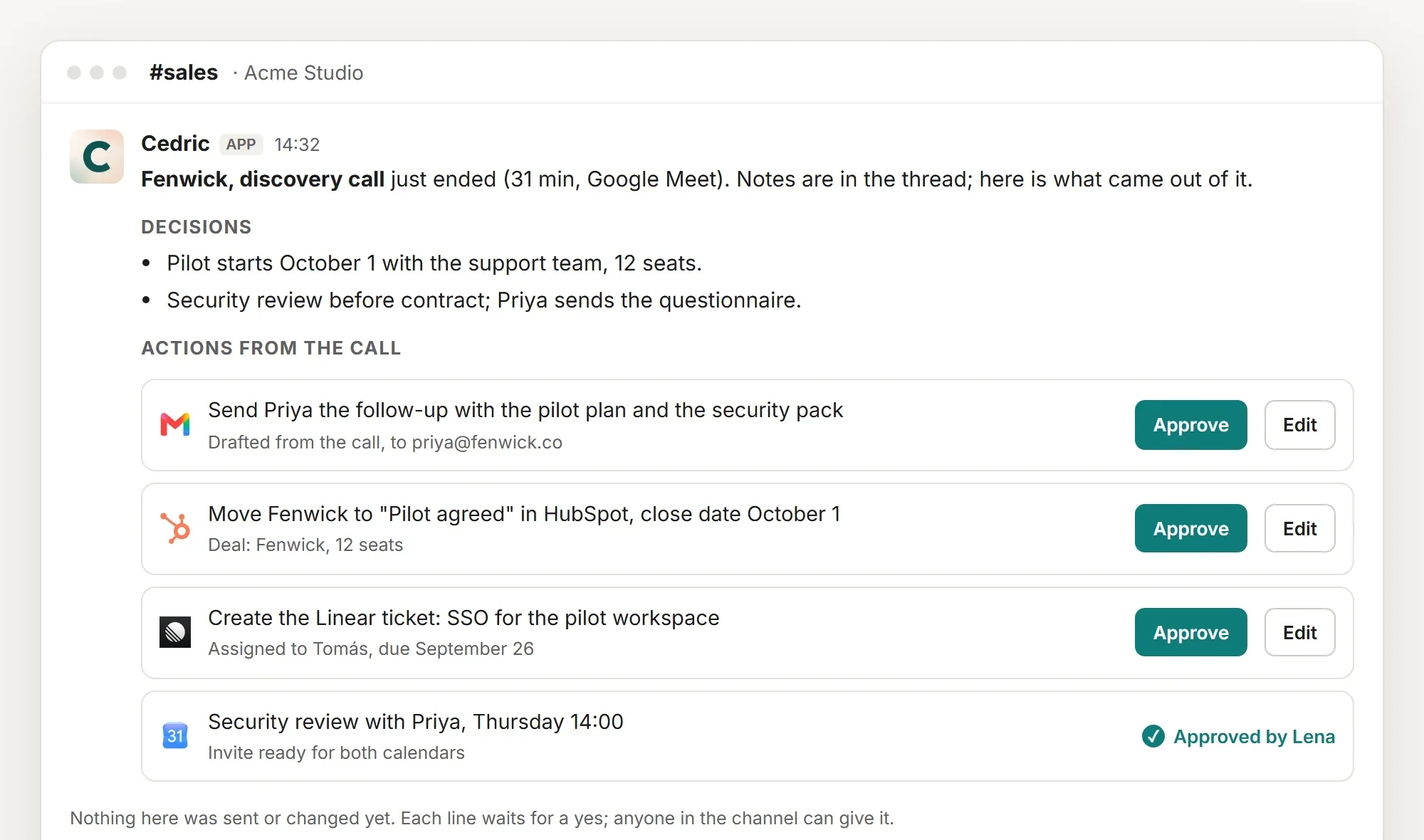
Cedric lives in Slack, Discord or Telegram, and for a sales team he takes the work between conversations. Ask "who is this new lead?" and he reads the mailboxes, the contact form and the CRM, looks the company up, gives a fit verdict with the reason, and drafts the reply. Put him on the invite for a sales call, and when it ends he posts the recap, the CRM update and the next meeting, each waiting for a yes. That is the picture above. On Monday, ask which deals have not moved in two weeks and he reads the pipeline back in plain words.
He works with the tools above. He connects to HubSpot, Salesforce, Pipedrive, Attio and Close, and through Apollo he searches prospects, enriches records and adds people to a sequence. Every email, CRM change and sequence enrollment is a proposal in the channel first, where the whole team can see it. See how approvals work.
There is no price per seat. One Cedric serves the whole workspace, which starts with 100,000 free credits, worth $50, no card. Plans start at $19 a month for the whole team.
Pros
- Qualifies inbound, follows up calls and keeps the CRM current, from one chat.
- Asks before he sends, changes or spends anything.
- No seats. The whole team works with one Cedric.
- Connects to HubSpot, Salesforce, Apollo and 3,200+ other apps.
100,000 free credits to start, no card; plans from $19 a month for the whole team, no seats.
Side by side
The same six, on the questions that decide it.
| Apollo | Clay | HubSpot agent | Agentforce | Artisan | Cedric | |
|---|---|---|---|---|---|---|
| Best at | Outbound, all in one | Data and enrichment | Prospecting in HubSpot | Every stage in Salesforce | Hands-off outbound | The work around each deal |
| Finding leads | 240M-contact database | 150+ data providers | Signals, enrichment, partners | Ranks your Salesforce leads | 250M+ contacts | Your inbox, forms and Apollo |
| Outreach | Sequences | Sequencer or integrations | Drafts, review or auto | Personalized outreach | Sends and replies alone | Drafts, sent on a yes |
| After the call | Call insights on Professional | CRM sync on Growth | Deal progression on Professional | Opportunity updates | Two-way CRM sync | Recap and CRM update, on a yes |
| Where you use it | Apollo, Gmail, browser | Clay tables | HubSpot | Salesforce, Slack | Artisan, Slack updates | Slack, Discord, Telegram |
| Pricing model | Per seat | By usage, unlimited seats | Seats plus $1 a lead | Per action or per user | Scoped by volume | Per workspace, no seats |
| Free start | Free plan | Free plan | Needs Starter or up | Foundations | Demo | 100,000 credits |
Read on each tool's own site on September 27, 2026.
How to choose
If you need people to write to and a way to write to them, start with Apollo. Its free plan is enough to find out. If your team likes to build and your data needs are unusual, pick Clay. If HubSpot is your CRM, try its prospecting agent before you buy anything else, since you pay per lead. If you run on Salesforce, Agentforce reaches every corner of it. If you want outbound run for you at volume and have a sales-sized budget, look at Artisan.
If the pain sits between the conversations, the inbound nobody read and the CRM that is a week behind, that is Cedric. He connects to Apollo, HubSpot and Salesforce, so he can run beside whichever of the others you pick.
What still needs a person
Who you sell to. Every tool here can rank accounts against a profile. None of them can tell you the profile is wrong.
The first version of your message. Write it yourself, then let an agent vary it. Agents copy the voice they are given.
Anything that commits a price, a term or a date. Keep those behind an approval, whichever tool sends them.
FAQ
Software that carries a sales task to the end instead of answering one question: finding contacts, writing and sending outreach, handling replies, or updating the CRM after a call. The tools above differ mostly in which of those jobs they own, and how much they do before a person checks.
Artisan's own answer is that Ava runs the repetitive outbound so reps spend their time on live conversations. We agree. The agents take the research, the first drafts and the data entry. The conversation that wins the deal still needs a person.
Yes. Connect them from the dashboard. With Apollo he searches and enriches prospects and manages sequences. With HubSpot or Salesforce he looks up and updates records. Every write waits for your yes.
Start free: Apollo and Clay both have a free plan, and Cedric starts with 100,000 free credits. After that, look at the pricing model. Per-seat tools cost more with every hire. Clay and Cedric do not charge per seat.
Check the approval settings before the first send. HubSpot's agent lets you review drafts first, Artisan has an approval mode, and Cedric asks before every email by design. Start with approvals on, and loosen them only where the drafts have earned it.
Free credits available, no card, no seats.